Should you use AI, RPA, an AI agent, or workflow automation? Learn how each works, where it fits best, and how to choose the right technology for your process.
Should I Use AI, RPA, an AI Agent, or Workflow Automation?
The right automation technology depends on four things: how predictable the process is, what kind of information it uses, how many decisions it requires, and how much autonomy you want the system to have.
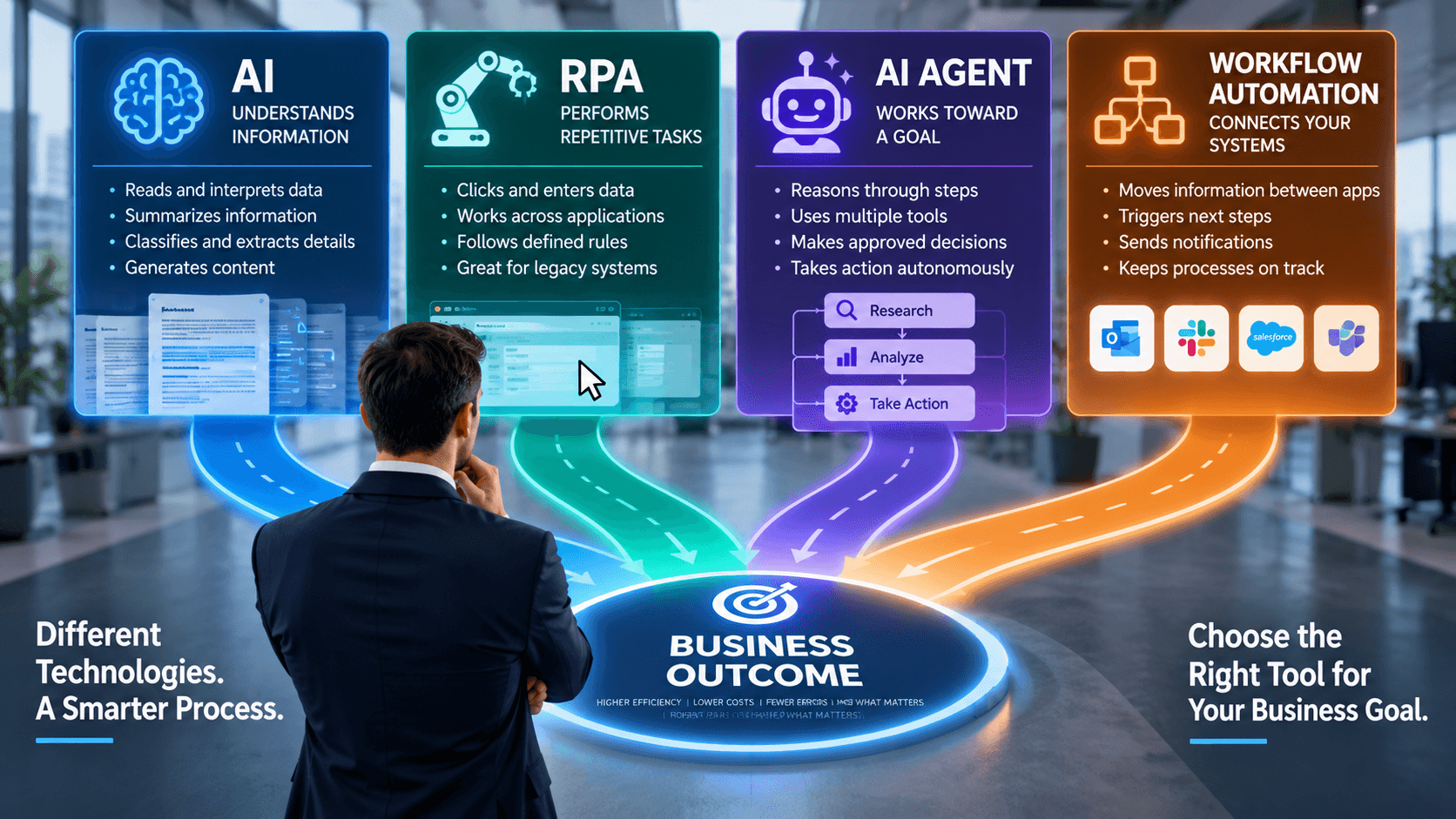
As a general rule, use workflow automation for predictable system-to-system processes, RPA for repetitive work that requires interacting with software like a human, AI when information must be interpreted or generated, and an AI agent when the system needs to reason through multiple steps and take approved actions.
And sometimes the best answer is a combination of all four.
The mistake is starting with, “We want an AI agent.”
Start instead with:
“What business problem are we trying to solve?”
Then choose the simplest technology capable of solving it reliably.
First: What’s the Difference Between AI, RPA, AI Agents, and Workflow Automation?
Before deciding which technology to use, it helps to separate terms that are often used interchangeably.
Technology
Best At
Simple Example
Workflow Automation
Moving structured information through predictable steps
New website lead → CRM → notification → follow-up task
RPA
Repetitive, rules-based work inside software
Open application → copy data → enter it into another system
AI
Understanding or generating unstructured information
Read an email → determine intent → summarize it
AI Agent
Working toward a goal using information and approved tools
Research software → evaluate findings → generate recommendations
Innovative Automations implements AI, robotic process automation, and custom workflows rather than treating every automation opportunity as an AI project.
The differences matter because choosing more sophisticated technology than you need can make an automation more expensive, harder to maintain, and less predictable.
1. Use Workflow Automation When the Process Is Predictable
Traditional workflow automation is often the best choice when the process can be described as:
When X happens → do Y → then do Z.
For example:
A prospect completes a form.
The system creates a CRM record.
The salesperson receives a notification.
A follow-up task is scheduled.
A confirmation email is sent.
There may be several steps, but there is very little ambiguity.
The automation doesn’t need to “think.” It simply needs to follow instructions consistently.
Good Candidates for Workflow Automation
Think about processes involving structured data and clearly defined triggers:
Form submissions → CRM updates
New customers → onboarding tasks
Completed sales → accounting notifications
Support tickets → routing rules
Employee changes → internal notifications
Scheduled reports → email distribution
If you can draw the process as a straightforward flowchart with very few judgment calls, workflow automation may be enough.
And that’s a good thing.
You don’t receive extra business value simply because something contains AI.
2. Use RPA When Someone Is Repetitively Clicking and Typing
Robotic Process Automation, or RPA, becomes useful when the work is predictable but the applications involved do not integrate easily.
RPA is software that can perform repetitive computer tasks similar to how a person performs them—opening applications, entering information, moving data, and following a defined sequence.
This is particularly useful with legacy software or systems without usable APIs. Innovative Automations describes RPA as especially appropriate for high-volume, rules-based work such as data entry, invoice processing, support tickets, onboarding, and recurring reports.
Imagine an employee whose daily process is:
Open System A.
Find a customer record.
Copy five fields.
Open System B.
Search for the same customer.
Enter those five fields.
Save the record.
Repeat 75 times.
That employee is not being paid for judgment.
They are being paid to act as the connection between two pieces of software.
That's a classic RPA opportunity.
A Real Example: 20 Minutes Down to 3–5
Innovative Automations worked with an MSP that needed to automate new-user onboarding.
The manual process took approximately 20 minutes per user.
After automation, that process was reduced to roughly 3–5 minutes.
Instead of employees repeatedly performing the same steps, the automation handled the predictable work and


