
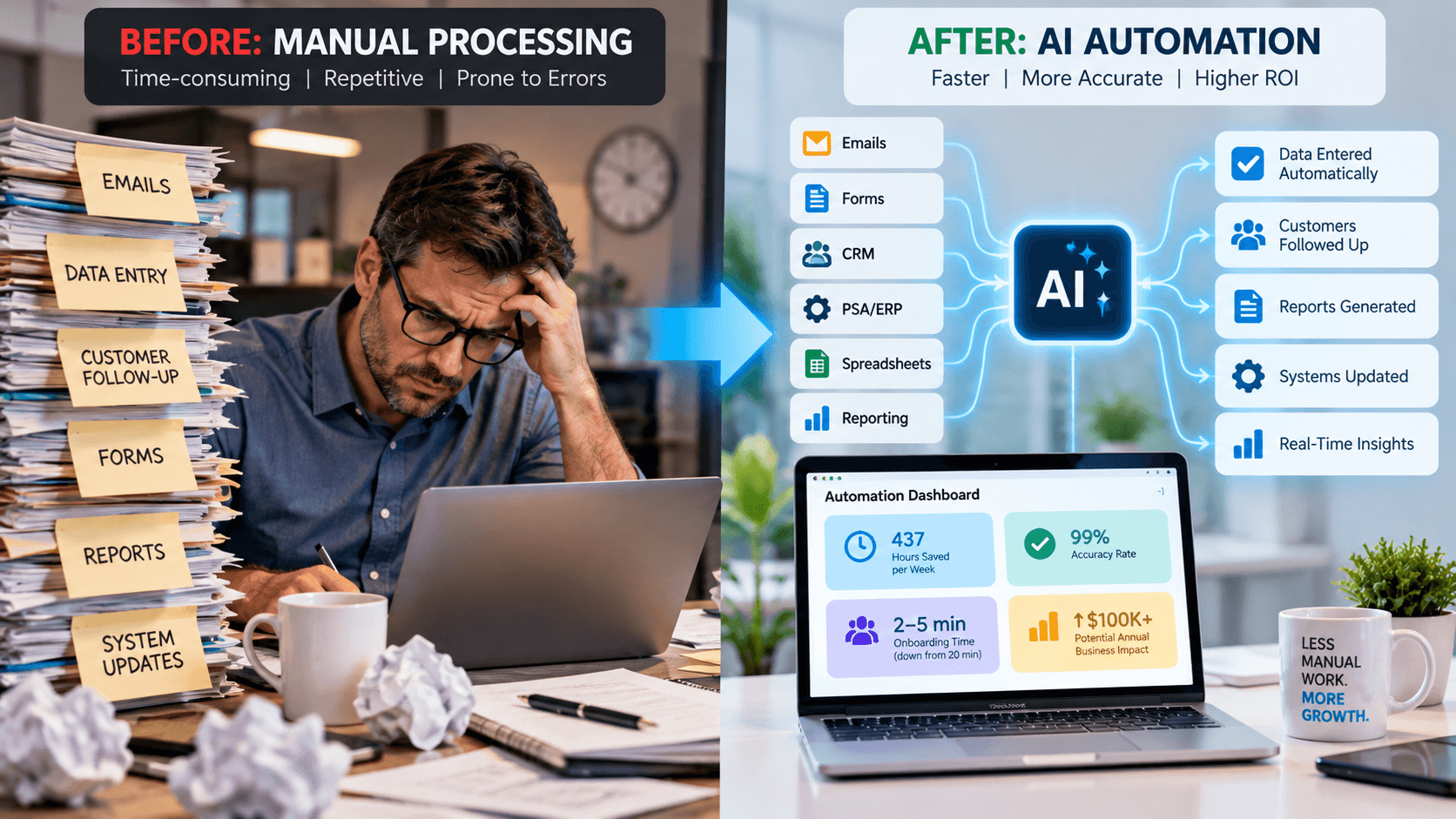
The fastest AI automation ROI comes from repetitive, high-volume processes. Learn 5 areas to prioritize and a simple framework for measuring business impact.
What Business Processes Produce the Fastest ROI From AI Automation?
It is astounding when you realize the amount of time that can be saved by automating a repetitive task. We just had one of our staff members tell us this week that something that took her 8 - 10 hours per client is now being done in minutes. Minutes compared to hours! And it did not replace our staff member, it makes her infinitely more productive.
The business processes that typically produce the fastest ROI from AI automation share five characteristics: they happen frequently, consume significant employee time, follow a repeatable process, create costly delays or errors, and can be measured before and after automation.
For most growing businesses, the best first opportunities fall into five categories: data entry and system updates, customer or employee onboarding, lead follow-up, document and email processing, and reporting or information retrieval.
The goal is not to automate the most impressive process.
It is to automate the process where a relatively small change can create a measurable business result.
At Innovative Automations, we often see the best results when companies start with repetitive work, error-prone processes, and bottlenecks that are already slowing growth.
1. Data Entry and Moving Information Between Systems
One of the fastest automation wins is often hiding in plain sight:
Employees copying information from one system into another.
Examples include:
- Entering website leads into a CRM
- Moving information from email into a ticketing system
- Updating customer records
- Entering order information
- Transferring data between spreadsheets and business applications
- Creating users in multiple systems
- Updating PSA, ERP, CRM, or accounting platforms
These processes are good candidates because they are usually high-frequency, repetitive, and measurable.
Imagine an employee spends only 5 minutes transferring information for a task that happens 40 times per day.
That's more than 3 hours of manual work every business day.
Automation may be able to perform much of that work in seconds.
Why the ROI Can Appear Quickly
The return isn't limited to labor savings.
Automating data movement can also reduce:
- Typing errors
- Duplicate information
- Missed steps
- Delayed processing
- Rework
- Employee frustration
The process doesn't have to involve sophisticated AI, either.
Sometimes traditional workflow automation or RPA is the right solution. AI becomes valuable when the information is less structured—for example, when a system needs to interpret an email, extract information from a document, or determine what action should happen next.
The best automation uses the simplest technology capable of solving the business problem.
2. Customer and Employee Onboarding
Onboarding is another high-ROI automation opportunity because it combines repetition, multiple systems, deadlines, and the need for consistency.
Consider employee onboarding.
Someone may need to:
- Create an account.
- Assign Microsoft 365 licensing.
- Add the employee to groups.
- Configure application access.
- Create tickets.
- Notify managers.
- Document what was completed.
When performed manually, the process may consume technician or administrative time every time someone joins the organization.
A Real Example: From 20 Minutes to 3–5 Minutes
Innovative Automations worked with an MSP that already owned an automation platform but didn't have enough internal time to build the workflow it needed.
One of its repetitive processes was new-user onboarding.
The original process took approximately 20 minutes per user.
After automation, the process was reduced to approximately 3–5 minutes.
The workflow also used dynamic information from Microsoft 365 instead of requiring employees to maintain separate user lists manually.
If we use the midpoint of 4 minutes, that's an approximately 80% reduction in processing time.
And the return compounds.
Automate a process that happens once per year and the impact may be small.
Automate a 20-minute process that happens repeatedly across customers, locations, or employees and the savings accumulate every time the workflow runs.
That's why frequency matters so much when evaluating automation ROI.
3. Lead Response and Customer Follow-Up
Some automation projects generate ROI by reducing labor.
Others generate ROI by helping the company capture revenue that would otherwise be lost.
Lead follow-up is a great example.
Imagine two businesses receive the same lead.
One responds within minutes.
The other responds tomorrow morning.
Automation can help:
- Route leads immediately
- Create CRM records
- Notify the correct salesperson
- Send personalized acknowledgments
- Schedule follow-up tasks
- Trigger reminders
- Identify leads that have not received attention
The employee doesn't disappear from the process.
Instead, automation makes sure the opportunity reaches that employee quickly.
Measure Revenue, Not Just Time
This is where traditional automation ROI calculations can underestimate the value.
Innovative Automations has previously illustrated a scenario where automation saved approximately 15 hours per week, creating roughly $27,000 in annual labor savings at a $35 hourly labor rate.
But faster lead response resulted in just two additional $3,500 deals per month, which represented another $84,000 in annual revenue.
In that example, the combined business impact exceeded $100,000 annually.
The important lesson is not that every automation produces those exact numbers.
It's that companies should ask:
“What happens to revenue when this process becomes faster?”
Sometimes that answer matters more than the hours saved.
4. Email, Documents, Forms, and Other Unstructured Information
This is an area where AI can add value beyond traditional automation.
Traditional automation is excellent when information is predictable.
If Field A always contains a customer number and Field B always contains an invoice amount, the workflow is straightforward.
But businesses also receive information through:
- Emails
- PDFs
- Contracts
- Forms
- Support requests
- Invoices
- Notes
- Chat conversations
- Free-text descriptions
Humans traditionally have to read that information, understand what it means, and decide what happens next.
AI can help perform that interpretation.
For example:
Email arrives → AI identifies intent → extracts important information → automation updates the appropriate system → employee reviews exceptions.
Or:
Document arrives → AI extracts specified information → validates it → updates a business application → routes unusual cases to a person.
This combination of AI and traditional automation is sometimes called cognitive automation: automation that can work with less-structured information instead of relying only on rigid rules.
Look for High-Volume Information Work
This category can create particularly strong ROI when employees repeatedly:
- Read similar emails
- Review documents
- Classify requests
- Extract information
- Summarize records
- Decide which department receives something
- Re-enter the resulting information elsewhere
If a highly paid employee spends hours each week simply reading, sorting, copying, and routing information, that's an automation opportunity worth evaluating.
5. Reporting, Dashboards, and Finding Information
Many businesses don't realize how much employee and leadership time is spent looking for information.
Managers ask:
- Where does this project stand?
- How many leads came in this week?
- Which tickets are overdue?
- What happened with this customer?
- Which invoices are outstanding?
- How is this department performing?
Someone then:
- Opens several systems.
- Exports data.
- Updates a spreadsheet.
- Checks numbers.
- Builds a report.
- Sends it to leadership.
Then they do it again next week.
Automation can change that.
Information can be gathered automatically, dashboards can stay current, reports can be generated on schedule, and AI can sometimes provide a conversational layer over approved business information.
Instead of asking an employee to spend an hour creating a report, a manager may be able to ask:
“Which customer projects are behind schedule, and what is causing the delay?”
The value isn't only the hour saved creating the report.
It's also faster decision-making.
Innovative Automations identifies reclaimed leadership time as one of four often-overlooked forms of automation ROI, alongside revenue recovery, capacity creation, and risk reduction.
Which Processes Should You Automate First?
Not every process that can be automated should be automated first.
We recommend evaluating potential projects using a simple 5-factor ROI scorecard.
Give each process a score from 1 to 5 in each category.
Factor
Question
Frequency
How often does this process happen?
Time
How much employee time does each occurrence consume?
Errors
How costly are mistakes or missed steps?
Business Impact
Does the process affect revenue, customers, capacity, or risk?
Automation Fit
How repeatable and clearly defined is the process?
A process that scores high across all five categories should move toward the top of the list.
Example
Consider two automation ideas.
Process A: An executive prepares a board report manually for two hours once every quarter.
Process B: Five employees each spend 30 minutes every day transferring information between two systems.
The executive report may sound more strategic.
But Process B consumes roughly:
5 employees × 0.5 hour × 5 days = 12.5 hours per week.
Across 50 working weeks, that's approximately:
625 hours per year.
That's why automation prioritization should be driven by math, not novelty.
A Simple ROI Formula for AI Automation
You don't need a complex financial model to evaluate the first opportunity.
Start with:
Annual Hours Saved × Loaded Employee Cost = Direct Labor Value
For example:
A process takes 15 minutes.
It happens 40 times per week.
That's:
10 hours per week.
Across 50 working weeks:
500 hours per year.
At a loaded labor cost of $40 per hour:
500 × $40 = $20,000 in annual labor value.
Then ask whether automation also creates:
- Additional revenue
- More capacity
- Fewer errors
- Faster customer response
- Lower compliance risk
- Better employee experience
- Reclaimed management time
Those additional returns can sometimes be more valuable than the direct labor savings.
Don't Automate a Bad Process Faster
There is one important warning.
Automation doesn't automatically fix a poorly designed business process.
It can simply make a bad process happen faster.
Before automating, ask:
Does this step actually need to exist?
Could the process be simplified first?
Why does this require approval?
Why are we entering this information twice?
Why are five people involved?
Why does this report exist?
Sometimes the best automation project begins by removing unnecessary work before automating what remains.
That's why Innovative Automations starts with the business process rather than immediately selecting technology.
How Quickly Should an Automation Produce ROI?
There isn't one universal answer.
The timeline depends on:
- Complexity
- Number of systems involved
- API availability
- Data quality
- Process volume
- Security requirements
- Amount of human review needed
- Implementation cost
- Value created each time the automation runs
But this is precisely why high-frequency processes often create faster ROI.
Another Example: 437 Hours Per Week
One Innovative Automations MSP case study reports automation initiatives that ultimately saved approximately 437 hours per week across workflows while improving accuracy and service delivery.
That kind of result does not come from automating one clever task.
It comes from identifying repeated operational friction and systematically removing it.
The first successful automation creates confidence.
Then you build the next one.
And the returns begin to compound.
Where Does AI Actually Belong?
Not every automation requires AI.
This distinction matters.
Use Traditional Automation When:
- Rules are predictable
- Data is structured
- Steps are consistent
- Decisions are deterministic
For example:
When this form is submitted → create this record → send this notification.
Use AI When:
- Information is unstructured
- Language must be interpreted
- Documents need to be understood
- Requests need classification
- Information needs summarization
- A recommendation is required
For example:
Read this customer email → determine what the customer needs → extract relevant details → route it to the correct workflow.
Use AI + Automation Together When:
AI needs to understand something and automation needs to do something.
That's often where some of the most useful real-world business solutions live.
The objective is not to put AI everywhere.
The objective is to use the right technology for each part of the process.
The 7 Questions to Ask Before Automating a Process
Before investing in an automation project, ask:
- How many times does this process happen each week?
- How long does each occurrence take?
- Which employees are involved?
- What happens when the process is delayed or completed incorrectly?
- Does it affect revenue, customer experience, risk, or growth?
- What systems and information are involved?
- What measurable result would tell us the automation worked?
If you cannot answer #7, don't build yet.
Define success first.
It might be:
Reduce processing time from 20 minutes to under 5.
Reduce manual work by 15 hours per week.
Respond to every qualified lead within 10 minutes.
Eliminate duplicate data entry.
Cut onboarding turnaround from two days to two hours.
Specific targets make it much easier to determine whether an automation actually produced ROI.
The Fastest ROI Usually Comes From the Work Nobody Wants to Do
Companies often begin their AI journey looking for something transformational.
A sophisticated AI agent.
A company-wide chatbot.
A completely autonomous business process.
Those projects may eventually make sense.
But the fastest ROI is often hiding in work that seems much less exciting:
Copying information.
Creating accounts.
Reading repetitive emails.
Sending follow-ups.
Building reports.
Updating systems.
Routing requests.
These tasks happen repeatedly, consume valuable employee capacity, create opportunities for error, and rarely represent the best use of your team's expertise.
That's why they're such good candidates.
How Innovative Automations Finds High-ROI Opportunities
At Innovative Automations, we don't start by asking:
“Where can we put AI?”
We start by asking:
“Where is friction costing this business the most?”
That means looking for:
- Repetitive work
- Manual handoffs
- Delayed follow-up
- Bottlenecks
- Rework
- Errors
- Underused software
- Processes preventing employees from doing higher-value work
Then we determine whether the right solution is:
- Workflow automation
- RPA
- AI
- An AI agent
- A custom integration
- Or a combination of technologies
The technology should follow the business case.
The Bottom Line: Automate for Business Impact, Not Novelty
The processes that produce the fastest ROI from AI automation generally have five things in common:
They happen frequently.
They consume meaningful employee time.
They follow a repeatable pattern.
Delays or mistakes have a measurable cost.
Success can be measured.
Start with data movement, onboarding, lead follow-up, document and email processing, and reporting or information retrieval.
Then calculate more than hours saved.
Measure:
Labor savings. Revenue recovery. Capacity creation. Risk reduction. Leadership leverage.
The best first automation isn't the one that gets the biggest reaction in a demo.
It's the one that makes someone in your business say:
“I can't believe we used to do this manually.”
Want to know which processes in your business are most likely to produce fast automation ROI? Innovative Automations can help you identify your highest-value opportunities, prioritize them by business impact, and determine the right combination of AI and automation to solve them.


