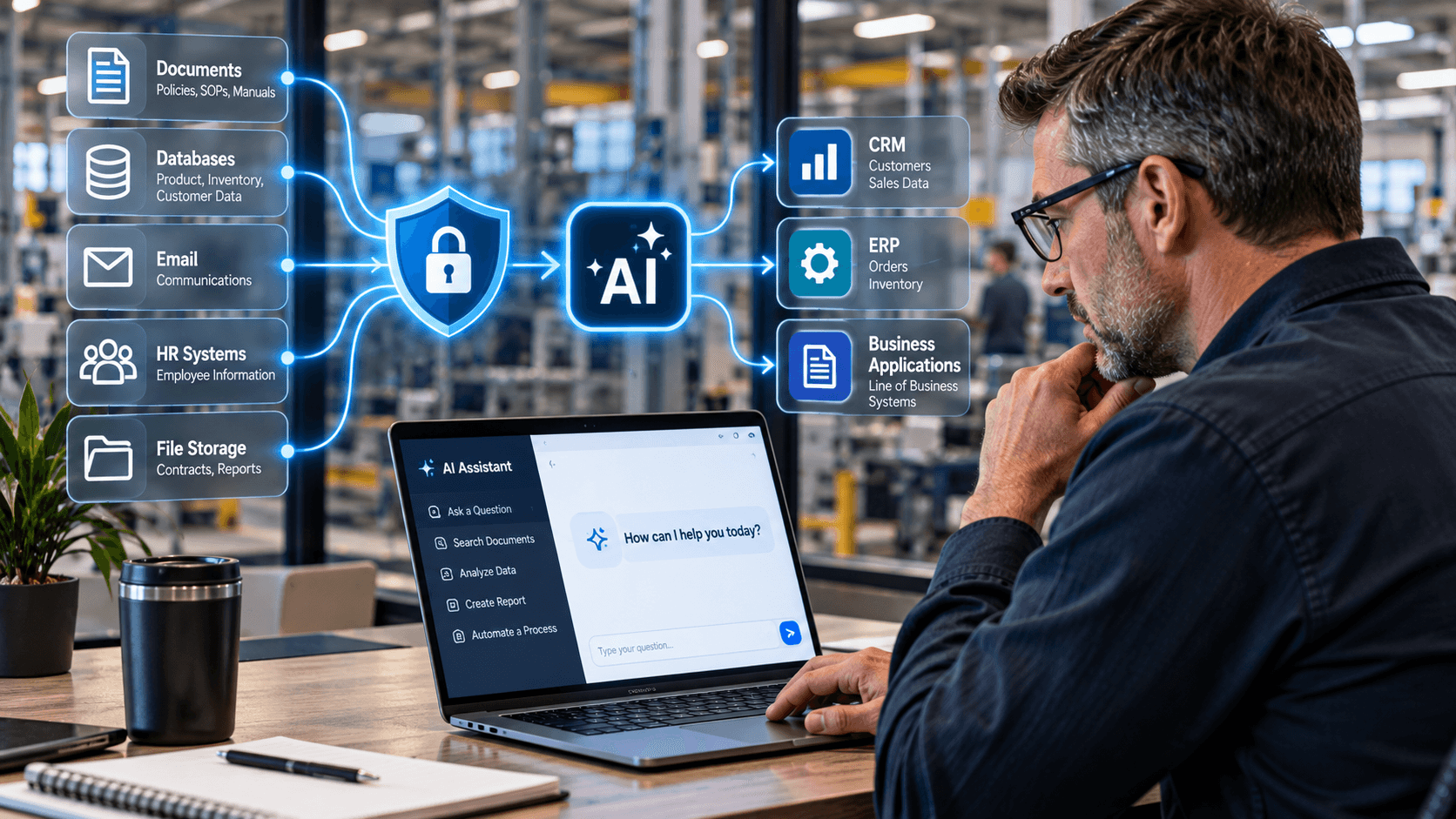
AI can safely connect to private business data and software when the integration is designed correctly. Learn six safeguards for protecting company information while using AI.
Is It Safe to Connect AI to My Company’s Private Data and Business Software?
Yes, AI can be safely connected to private company data and business software—BUT ONLY when the integration is designed with security, permissions, data boundaries, and ongoing monitoring in mind.
Businesses should evaluate six safeguards before connecting AI to internal systems: data classification, model privacy, least-privilege access, secure integrations, human approval, and ongoing monitoring.
The biggest mistake is treating AI like just another software application and not knowing what AI tools employees are using on their own.
Once an AI system can read documents, access a CRM, query an ERP system, interact with email, or take actions inside business applications, it becomes part of your technology and cybersecurity environment.
That can create tremendous value.
It can also create new risk if the connection is built without proper controls.
Here is what business leaders should understand before giving AI access to company data.
1. Decide What Data the AI Actually Needs
The first question shouldn't be:
“What can we connect to AI?”
It should be:
“What information does the AI need to accomplish this specific task?”
Those are very different questions.
Imagine you want an AI assistant to help employees answer questions about company procedures.
It might need access to:
- Employee handbooks
- Standard operating procedures
- Product documentation
- Approved knowledge-base articles
- Training materials
It probably does not need access to:
- Payroll records
- Banking information
- Employee Social Security numbers
- Executive email
- Customer payment information
- Every file on the company network
The safest AI implementations start with a clearly defined business purpose and then expose only the information needed for that purpose.
Think in Terms of Data Boundaries
Before building an automation, classify the information involved.
A simple framework might look like:
Public: Information anyone can see.
Internal: Business information that isn't public but isn't highly sensitive.
Confidential: Customer information, financial data, employee records, intellectual property, or other restricted information.
Regulated: Information subject to contractual, industry, or regulatory requirements.
The more sensitive the data, the more carefully the AI architecture needs to be designed.
NIST's Generative AI Risk Management Profile recommends considering privacy, security, resilience, and third-party components throughout the AI lifecycle—not just after a system has been deployed. NIST
2. Understand Where Your Data Goes
Not all AI implementations handle information the same way.
This is one of the most important questions to ask an AI automation provider:
“When our data is sent to the AI, where does it go and what happens to it?”
You should understand:
- Which AI model receives the information
- Whether data leaves your environment
- Whether prompts or files are retained
- Whether the provider uses submitted information for model training
- Which third parties process the information
- How long information is retained
- How it is protected
- How it can be deleted
Innovative Automations frequently uses Retrieval Augmented Generation, or RAG, when an AI assistant needs to answer questions using a defined set of business information.
RAG can allow the system to retrieve relevant information from an approved knowledge source instead of simply allowing an AI tool unrestricted access to everything the company owns. Innovative Automations has also emphasized that protecting proprietary data requires evaluating the privacy and security of the entire chain—including any external model connected to the system. Innovative Automations
Public AI Tools Require Particular Care
Employees should not assume that because an AI application is easy to use, it is appropriate for confidential business information.
Before entering customer records, proprietary documents, contracts, financial information, or other sensitive material into an AI tool, the business should know what product is being used and what its data-handling terms are.
That is one reason every company adopting AI should have an AI acceptable-use policy.
Innovative Automations recommends that organizations inventory the AI tools employees are using, establish an approval process, and evaluate what information each tool receives before allowing it into normal workflows. Innovative Automations
3. Give AI the Minimum Access It Needs
This may be the single most important technical principle.
An AI system should not automatically receive administrator-level access just because broader permissions make the integration easier to build.
Instead, follow the principle of least privilege.
If an automation only needs to read customer names from your CRM, don't give it permission to:
- Delete customers
- Modify billing
- Send emails
- Export the entire database
- Change user accounts
If an AI tool only needs to look up inventory, it probably shouldn't be able to modify inventory quantities.
This becomes especially important as businesses begin using AI agents that can take actions, rather than simply answer questions.
OWASP identifies “excessive agency” as a significant AI security risk. Giving an AI system too much functionality, too many permissions, or too much autonomy can increase the consequences if something behaves unexpectedly or is manipulated. OWASP Gen AI Security Project
Treat AI Access Like Employee Access
A useful analogy is hiring a new employee.
You wouldn't give a new accounts-payable employee:
- Domain administrator credentials
- Access to every HR record
- Permission to modify your CRM
- Access to every customer file
- Control over your firewall
You would give that employee the permissions needed to perform the job.
AI should be treated the same way.
4. Secure the Connections Between AI and Your Software
AI becomes particularly useful when it connects to the software your company already uses.
That might include:
- CRM
- ERP
- PSA
- Accounting systems
- Ticketing systems
- Microsoft 365
- Document-management platforms
- HR systems
- Line-of-business applications
- Custom databases
Those connections are commonly created through APIs, and increasingly through technologies such as Model Context Protocol (MCP).
These connections need to be treated as security-sensitive.
Don't Hand Out Unlimited API Keys
API credentials should be:
- Documented
- Protected
- Limited to necessary permissions
- Associated with a specific purpose
- Monitored
- Rotated when appropriate
- Disabled when no longer needed
Innovative Automations has specifically warned businesses about over-provisioned and forgotten API access. Its guidance recommends auditing which API keys exist, who created them, what permissions they hold, and whether they are still being used. Innovative Automations
This becomes increasingly important as AI makes it easier for nontechnical users to connect applications.
Convenience should not bypass governance.
API vs. MCP
The right integration method also depends on the workflow.
Traditional APIs can provide powerful, direct software access. MCP can provide another structured way for AI systems to request tools or information.
Neither option automatically makes an integration secure.
Proper permissions and configuration still matter.
Innovative Automations' guidance is to evaluate the requirements of the specific workflow and limit the connection to the information and capabilities it actually needs. Innovative Automations
5. Keep Humans Involved in High-Risk Decisions
Not every AI action should happen automatically.
Automation works extremely well for predictable, low-risk activities.
For example:
Read a document → extract information → update a reporting dashboard.
That may be appropriate for full automation.
But consider:
AI reviews an email → decides a $100,000 payment request is legitimate → changes a bank account → releases payment.
That's a very different level of risk.
Businesses should decide where human approval belongs in the workflow.
A useful three-level model is:
Level 1 — AI Recommends
AI analyzes information and recommends an action.
Human makes the decision.
Level 2 — AI Prepares
AI performs most of the process but pauses before an important action.
Human approves it.
Level 3 — AI Executes
AI completes the workflow automatically.
This is best suited to actions where the rules, permissions, and consequences are well understood.
For higher-risk workflows, human review provides an important control between AI output and business action.
Innovative Automations uses this principle in its own AI projects. For example, an internal tool that audits software stacks and generates client recommendations includes a human review step before reports are delivered. Innovative Automations
6. Monitor AI After It Goes Live
AI security isn't a one-time configuration project.
Once an automation is live, someone should continue asking:
- Is it accessing only the intended information?
- Are permissions still appropriate?
- Are API credentials still required?
- Are employees using unauthorized AI tools?
- Has connected software changed?
- Are errors occurring?
- Are unexpected requests being made?
- Are integrations still functioning as designed?
This matters because the environment changes.
Software vendors update APIs.
Employees leave.
New applications get installed.
Permissions expand.
Credentials become stale.
Business processes change.
An automation that was properly designed 12 months ago may need to be reviewed today.
That is why monitoring and governance need to be part of the ongoing AI lifecycle, rather than something performed only during implementation. NIST's AI risk-management guidance similarly treats risk management as a continuing process across design, deployment, operation, testing, and evaluation. NIST
A Real Example: Limiting What an AI Model Could See
Innovative Automations encountered this issue while building an automated system for a fitness company.
The workflow used AI to process unstructured meal-plan information and dramatically reduced the time required to create plans—from as much as 90 minutes manually to approximately 10–13 minutes for a full 13-week plan.
But the team deliberately controlled which information was passed to the AI model.
The system sent the information required to perform the task—such as meal ingredients and preparation details—without sending customer-facing or personally identifiable information.
That distinction is important.
The question wasn't:
“Can the AI process all of this data?”
It was:
“What is the minimum data the AI actually needs to perform this task?”
The resulting automation produced an 8x–9x reduction in processing time while keeping unnecessary sensitive information out of that part of the workflow. Innovative Automations
That's what secure AI design should look like.
What About AI Connected to Your CRM or ERP?
Connecting AI to a business application does not automatically make the project unsafe.
It simply means the integration needs to be designed carefully.
Consider an AI assistant connected to a CRM.
If a sales representative asks:
“What was the last conversation we had with ABC Manufacturing?”
The system may need permission to:
- Identify ABC Manufacturing.
- Read recent activities.
- Retrieve relevant notes.
- Summarize them.
- Return the answer.
It does not necessarily need permission to:
- Delete the account
- Change customer ownership
- Export every contact
- Access financial records
- Modify contracts
- Send email on behalf of the CEO
That is why scope and permissions matter as much as the AI model itself.
What Should You Ask an AI Automation Company About Security?
Before hiring someone to connect AI to your business systems, ask these 10 questions:
- What company data will the AI access?
- Where will that information be processed?
- Which AI models or third parties will receive it?
- Is any of our information retained or used for model training?
- What permissions will the integration receive?
- How are API keys and credentials protected?
- Can the AI take actions, or can it only retrieve information?
- Which actions require human approval?
- How will AI and API activity be logged and monitored?
- What happens if we stop using the automation?
If the provider cannot answer these questions clearly, keep asking.
“It's secure” isn't enough.
You should understand why it is secure.
A 6-Step Framework for Connecting AI to Business Data Safely
Business leaders don't need to become AI security engineers.
They do need a repeatable decision framework.
Before connecting AI to internal data or software, use these six steps:
1. Classify the Data
Determine whether the information is public, internal, confidential, or regulated.
2. Control the Model
Understand what AI service processes the data and how that service handles it.
3. Limit Permissions
Give the AI only the information and actions required for the workflow.
4. Secure the Integration
Protect APIs, credentials, databases, and other connections.
5. Add Human Approval Where Needed
Don't give an AI system unchecked authority over high-impact actions.
6. Monitor the Environment
Review permissions, activity, credentials, tools, and workflows over time.
That creates a much stronger foundation than simply connecting software and hoping the security settings are adequate.
Should Businesses Avoid AI Because of Security Concerns?
No.
Avoiding AI entirely doesn't necessarily eliminate the risk.
Employees may begin using AI tools independently anyway—creating what is commonly called Shadow AI.
That means the better strategy is usually governed adoption.
Give employees approved tools.
Define acceptable uses.
Protect sensitive information.
Control integrations.
Document who has access.
Monitor the environment.
And deliberately choose which processes should—or should not—use AI.
The objective isn't to remove every conceivable risk.
It's to manage AI risk the same way mature businesses manage other technology risks: through architecture, controls, policies, monitoring, and accountability. NIST's AI Risk Management Framework was created specifically to help organizations take this kind of structured approach. AIRC
How Innovative Automations Approaches Secure AI Integration
Innovative Automations focuses on applied AI and automation, not simply adding an AI chatbot to every business process.
Our team evaluates:
- What you're trying to accomplish
- Which systems are involved
- What information the workflow actually needs
- Whether an API, MCP connection, RAG environment, or another architecture makes sense
- Which permissions are required
- Where human oversight belongs
- How the automation will be monitored
The objective is to make your software and data more useful without giving AI unnecessary access to your business.
Sometimes the right solution uses AI extensively.
Sometimes only one portion of the workflow needs AI.
And sometimes a traditional automation is safer, simpler, and more cost-effective than AI.
The technology should follow the business requirement—not the other way around.
The Bottom Line: AI Can Access Private Business Data Safely—But Architecture Matters
Connecting AI to company data is not inherently unsafe.
Connecting it carelessly is.
Before giving AI access to your systems, focus on six fundamentals:
Know your data.
Know where it goes.
Limit what AI can access.
Secure the connections.
Keep people involved where the stakes are high.
Monitor everything over time.
The most secure AI implementation isn't necessarily the one with the most sophisticated model.
It's the one where the business clearly understands:
What the AI knows. What it can do. What it can't do. And who is watching.
Interested in connecting AI to your business systems without unnecessarily exposing your private data? Innovative Automations can help you evaluate the workflow, integration options, security considerations, and potential ROI before you build.


